Where do testimonials appear on my public profile?
Last updated: October 10, 2026
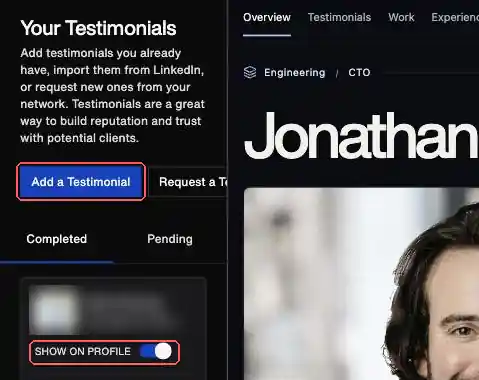
Testimonials with Show on profile switched on appear in the Testimonials section of your public Go Fractional profile.
Go straight there: app.gofractional.com/profile/testimonials
If a testimonial isn't showing
- Sign in at app.gofractional.com.
- Open Profile, then Testimonials.
- Find the testimonial under the Completed tab. A request that hasn't been answered yet sits under Pending and won't appear on your profile.
- Check that Show on profile is switched on.
- Wait a few minutes, then refresh your public profile. Public pages are cached, so changes take a moment.
Fixing a typo
Verified testimonials are written by the person who gave them, so you can't edit them yourself. If one has a typo, email hello@gofractional.com and we'll help.
Related articles: Can I reuse a testimonial from LinkedIn instead of requesting a new one? and I'm getting an error when requesting a testimonial through the app.